
Most pages do not fail in search because of some secret technical problem. They fail because of basics that were never checked. The title says one thing and the content says another. The headings are a mess. The images are huge. Nobody linked to the page from anywhere else on the site. None of this is hard to fix, but it is easy to miss when you are busy running a business.
That is exactly why an on-page SEO checklist is so useful. Instead of guessing, you walk through the same steps for every page and fix what is weak. You do not need to be an expert or know how to code. You just need a clear list and a little patience.
This guide gives you a complete on-page SEO checklist in plain language. You will learn what on-page SEO is, what to prepare before you start, and how to check your content, HTML, links, speed, and trust signals. You will also get checklists by page type, a refresh plan for old pages, and a copy and paste version you can use today. If you are still deciding where SEO fits in your marketing mix, our comparison of SEO vs PPC is a good place to start.
Key Takeaways
- On-page SEO means improving the things you control on a page, including content, HTML, links, and experience.
- Start with search intent. A perfectly formatted page still fails if it answers the wrong question.
- Write for people first, then make the page easy for search engines to read.
- Clean titles, headings, URLs, images, and internal links make a real difference.
- Fast, mobile friendly pages keep visitors on your site.
- Re-check important pages on a schedule. Good SEO is maintained, not finished.
What Is On-Page SEO?
Definition
On-page SEO is the practice of optimizing the parts of a web page that you can control so that search engines understand it and people enjoy using it. That includes the words on the page, the title and description, headings, images, links, and how fast and easy the page is to use.
The goal is simple. You want the right person to find your page for the right search, and to feel that it was worth the click.
On-Page vs Off-Page vs Technical SEO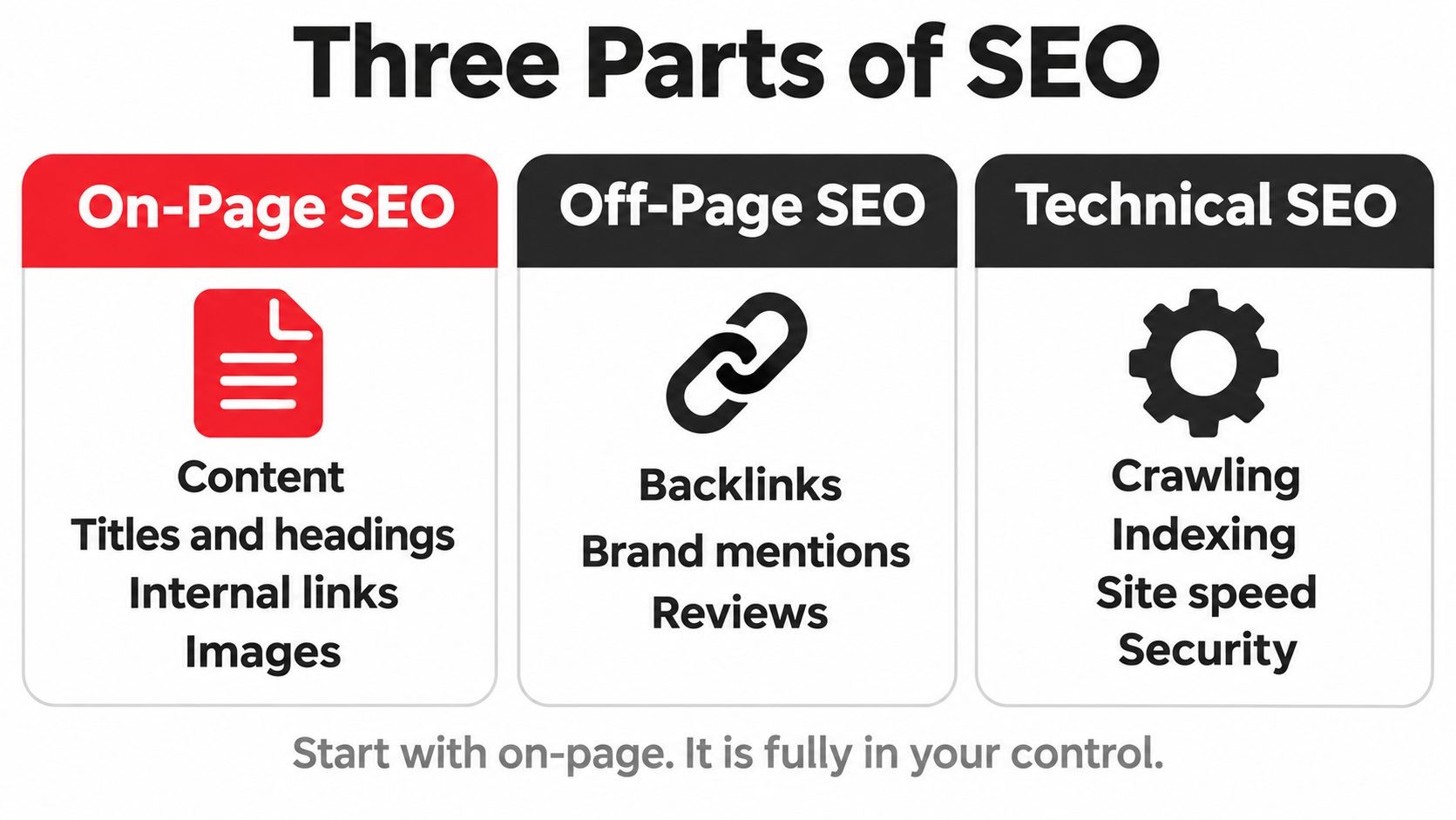
These three terms are often mixed up, so here is a quick way to think about them.
- On-page SEO covers what is on a single page: content, HTML elements, internal links, and images.
- Off-page SEO covers signals from outside your site, such as links from other websites, brand mentions, and reviews.
- Technical SEO covers how your whole site is built and crawled, including site structure, indexing, speed, and security.
They overlap, and a good strategy uses all three. But on-page SEO is the best place to begin, because every change is in your hands and does not depend on anyone else.
Why a Checklist Works
A checklist removes guesswork. It also keeps your pages consistent, which matters when several people write for the same site. When every page goes through the same review, you catch small mistakes before they add up. It also makes training new team members easier, because the standard is written down.
Before You Start
Pick One Target Page and One Primary Topic
Choose a single page to optimize and decide what it is mainly about. A page that tries to rank for five unrelated topics usually ranks for none of them. If you find yourself writing "and also" a lot, you may need two pages instead of one.
Do Quick Keyword and Intent Research
Find the main phrase people use when they search for your topic, plus a few closely related phrases. Then look at what people really want when they type it. Do they want a definition, a how-to guide, a product, or a local business? If you want a full process, our guide on how to find the right keywords for your business walks through it step by step.
Check What Already Ranks
Search for your main phrase and look at the first page. Notice the type of content, the format, and the questions that appear. You are not copying anyone. You are learning what Google believes searchers want, so your page can meet that need and add something better.
Set Up Search Console and a Baseline
Make sure Google Search Console is connected to your site. Before you change anything, note the page's current impressions, clicks, and average position. A baseline lets you see later whether your updates helped.
The Checklist, Part 1: Content and Search Intent
Content is the heart of on-page SEO. Everything else supports it, so start here.
Match Search Intent
Search intent is the reason behind a search. Someone who types "how to fix a leaky tap" wants steps. Someone who types "plumber near me" wants a business to call. If your page does not match that need, no amount of formatting will save it.
Ask three questions. What is the person trying to do? What format fits that goal? And what would a satisfied visitor do next? Then build the page around those answers.
Primary and Secondary Keywords, and Where to Place Them
Use your main keyword naturally in a few key places: the title, the first paragraph, at least one heading, the URL, and the image alt text where it fits. Add related phrases and common questions throughout the page. These help search engines understand the topic more fully.
Do not repeat the keyword over and over. Google's SEO starter guide specifically lists keyword stuffing among the things that do not help.
Here is a simple example. Imagine you run a dental clinic and want a page to rank for "emergency dentist." A natural page would use that phrase in the title and first paragraph, then use related words like "toothache," "same day appointment," and "weekend hours" where they fit the story. An unnatural page would repeat "emergency dentist" in every sentence and read like a robot wrote it. The first helps patients and search engines. The second helps nobody. If a sentence sounds awkward when you read it aloud, rewrite it.
Depth, Accuracy, and Information Gain
Cover the topic well enough that the reader does not need to go back to search again. Include steps, examples, and clear explanations. Then add something the other pages do not, such as a real example, a simple template, a checklist, or your own experience. That extra value is what often separates a page that ranks from a page that blends in.
Check your facts, and update anything that may be out of date. Wrong information hurts trust faster than anything else.
People-First Content and E-E-A-T
Google recommends creating helpful, reliable, people-first content, and its page on helpful, people-first content includes questions you can use to review your own work, such as whether the content shows first-hand expertise and whether a reader would feel they learned enough to reach their goal.
Show who wrote the page and why they know the subject. Add an author name, a short bio, and sources where it helps. If you offer a service, mention real experience, such as years in business, certifications, or project examples.
Readability and Scannability
A good test is to read your first screen out loud. Does it say what the page is about within a few seconds? If not, rewrite the opening. Replace long, complicated sentences with shorter ones, define unfamiliar terms the first time you use them, and use real examples instead of abstract claims.
Most visitors scan before they read. Use short paragraphs, clear headings, bullet lists, and plain words. Avoid long blocks of text. Put the answer near the top, then explain it. A page that is pleasant to read keeps people on it longer.
Snippet and AI Answer Friendly Formatting
Search results often show quick answers, lists, and tables. You can make your page easier to quote by answering common questions in one or two clear sentences, using lists for steps, and adding a short FAQ section. Do not write only for these features, but make the structure clean enough that a person or a machine can pull out a useful answer.
The Checklist, Part 2: HTML Elements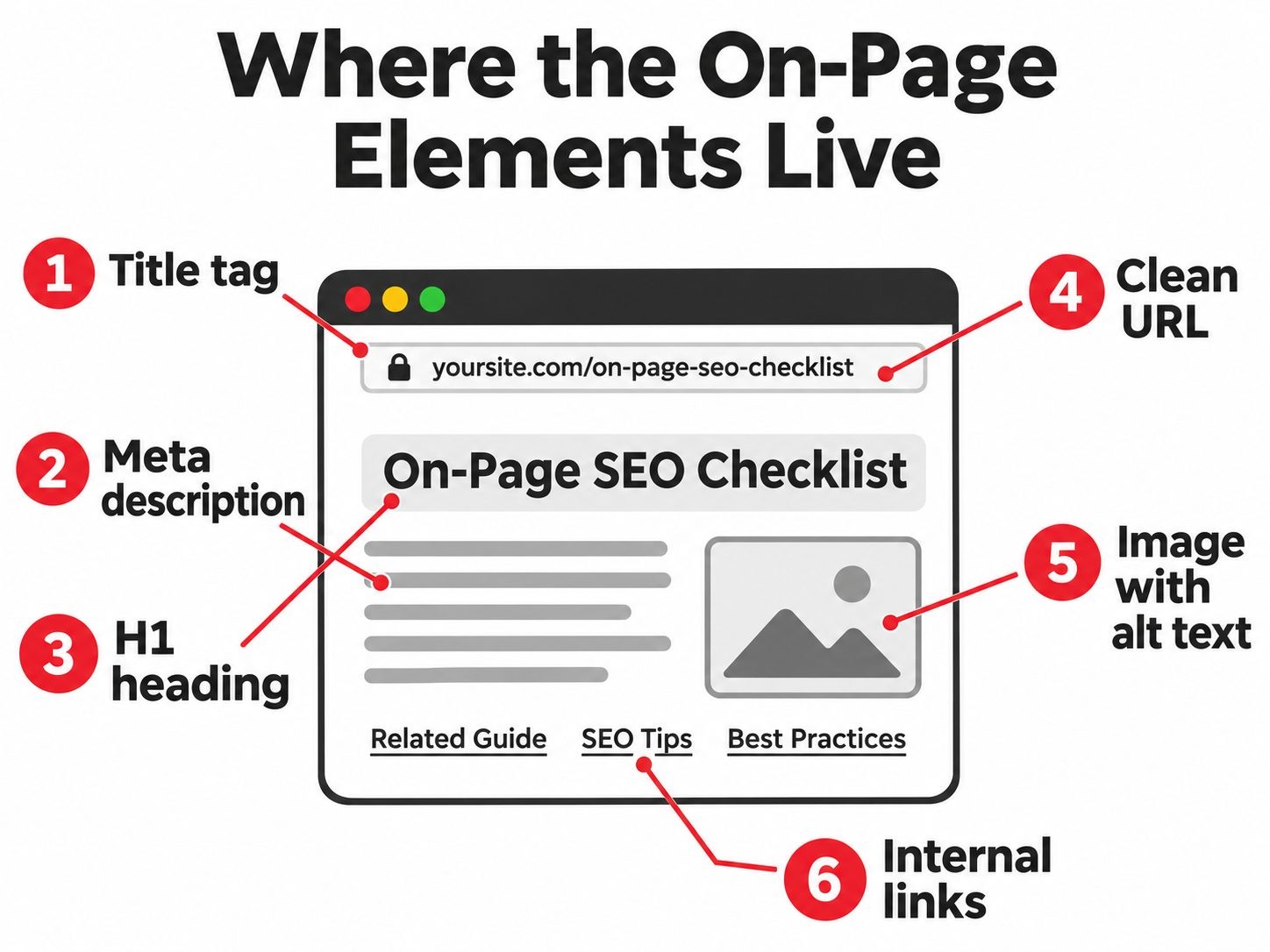
These are the technical building blocks of the page. You can usually edit them in your content management system without touching code.
Title Tag
The title tag is one of the strongest signals of what the page is about, and it often appears as the clickable headline in search results. Google's guidance on how it creates title links recommends that every page has its own title, that titles are specific and brief, and that you avoid repeating keywords or using the same boilerplate title across many pages.
Put your main keyword near the front when it fits naturally, keep the title short enough to be fully visible, and write it so that a human wants to click. Check every page for missing, duplicate, or vague titles. A free tool like the Meta Tag Analyzer can fetch a page and show its title, description, and other tags, with flags for length and missing items.
A quick before and after shows the difference. A weak title might be "Home | Smith Plumbing." A stronger one might be "Emergency Plumber in Austin | Same Day Service | Smith Plumbing." The second tells people and search engines what the page offers, where, and who it comes from, all in a few words.
Meta Description
The meta description is a short summary that may appear under your title in search results. It does not directly make a page rank higher, but a clear, helpful description can improve how many people click.
Write one unique description for every page. Mention the main benefit, include the keyword if it feels natural, and finish with a gentle reason to click. Keep it concise so it does not get cut off. Remember that Google may rewrite it, so make sure the page itself also supports a good snippet.
Headings: H1 to H3
Headings give your page structure. Use one H1 that clearly states the topic, then H2s for major sections and H3s for details inside them. Think of it like an outline. A reader should be able to understand the whole page from the headings alone.
Include your main keyword in the H1, and use related phrases and questions in other headings where they fit. Do not skip levels or use headings only to make text bigger.
URL Structure
Short, readable URLs are easier for people and search engines to understand. Use words, separate them with hyphens, and remove filler. A URL like /on-page-seo-checklist is better than /page?id=4827.
Group related pages in a logical way. A page about gutter cleaning might live under /services/gutter-cleaning, while a blog post might sit under /blog/how-to-clean-gutters. This helps visitors understand where they are, and it keeps your site tidy as it grows.
Keep the main keyword in the URL, avoid dates and unnecessary folders, and do not change a URL after it is live unless you set up a proper redirect.
Images, Alt Text, and File Size
Images make content easier to understand, but they can also slow a page down. Use real, relevant images, give each one a descriptive file name, and write alt text that explains what the image shows. Alt text helps people who use screen readers and gives search engines context.
Compress images before you upload them. Large files are one of the most common reasons a page loads slowly. A free Image Compressor can shrink PNG, JPEG, and WebP files so your pages load faster without a noticeable drop in quality.
Structured Data
Structured data, or schema markup, is code that describes your content in a standard format. It can help search engines understand things like articles, products, reviews, FAQs, and local businesses, and it may make a page eligible for enhanced results.
Add only the types that match the visible content on the page. Then test the markup with Google's tools to make sure it is valid. If you run a local business, our guide to local SEO for small businesses explains how local business schema fits in.
The Checklist, Part 3: Links
Internal Links
Internal links connect your pages to each other. They help visitors find related content, and they help search engines discover pages and understand how your site is organized.
Link from a page to other relevant pages using natural, descriptive anchor text. Link to new pages from older, stronger ones. Make sure every important page has at least a few links pointing to it, so it is not stranded on its own. Do not stuff a page with dozens of links. A handful of useful ones works better than a crowd.
External Links
Linking to trustworthy sources shows that you did your research and gives readers a way to learn more. Link to original studies, official documentation, and respected publications when they support your point. Open them in the same tab unless there is a good reason not to.
You do not need many. A few well chosen links often add more credibility than a long list.
Anchor Text and Link Health
Anchor text is the clickable text of a link. Make it descriptive, so a reader knows where it goes. "Our guide to keyword research" is better than "click here." Avoid repeating the exact same anchor everywhere, which can look unnatural.
A useful habit is to add internal links every time you publish something new. When you finish a post, ask yourself which three older pages should point to it, and which three pages it should point to. That quick routine builds a strong network of related pages over time, with no special tools.
Check for broken links regularly. A link that leads to an error page frustrates visitors and makes your site look neglected. Fix it, replace it, or remove it.
The Checklist, Part 4: Page Experience
Page Speed and Core Web Vitals
Slow pages lose visitors. Check how quickly your main content loads, and look for common causes such as heavy images, too many scripts, and slow hosting. Core Web Vitals are a set of measurements about loading, interactivity, and visual stability, and they are worth understanding. We cover them in detail in our guide to Core Web Vitals and SEO.
A good first step is to compress images, remove plugins or scripts you do not use, and make sure your hosting can handle your traffic.
Here is a simple speed test you can do at home. Open your page on your phone using mobile data, not Wi-Fi. Count how long it takes before you can read the main headline and tap a button. If you feel yourself waiting, your visitors do too. Note what loads last, such as a large banner image or a chat widget, and fix that first.
Mobile Friendliness
Most people visit sites on their phones, so test every important page on a small screen. Text should be readable without zooming. Buttons should be easy to tap. Menus, forms, and pop ups should not get in the way.
Open the page on your own phone and try to complete the main action, such as calling, booking, or buying. If it feels frustrating, your visitors will feel the same.
Clear Layout, Calls to Action, and Trust Signals
A page should make the next step obvious. Add a clear call to action, such as "Request a quote" or "Read the guide," and place it where visitors naturally look for it. Show trust signals like reviews, awards, guarantees, and contact details. A page that ranks but does not convert is only half done.
The Checklist, Part 5: Local and Trust Signals
NAP and Local Signals
If you serve a local area, make sure your business name, address, and phone number are shown clearly and match your listings everywhere else. Add a map and your service area where relevant. Your profile on Google also matters, so see our guide on how to optimize your Google Business Profile.
Reviews and Proof
Trust is part of on-page SEO because people leave pages they do not believe. A service page with no names, no photos, no reviews, and no address feels risky, even if the writing is good. Add small signals of reality, such as a photo of your team, a short customer quote, a phone number, and a clear explanation of your process.
Real customer reviews, case studies, and testimonials make a page more believable. Show them near the places where visitors decide, such as service pages and contact forms. Only display feedback that is genuine, and follow each platform's rules when you share it.
On-Page SEO by Page Type
Different pages need different emphasis. Use the main checklist, then add these extras.
Blog Posts
Answer a specific question completely, use a clear structure, and include examples. Add an author and an update date, link to related posts, and add an FAQ when it helps. Refresh posts when facts change.
A blog post also works best when it has a clear purpose beyond traffic. Ask what you want the reader to do after finishing it. It might be to read a related guide, download a checklist, or contact you. Add that next step in a natural place, and your post becomes part of your business, not just a page that gets visits.
Service Pages
Describe exactly what you offer, who it is for, and what happens next. Include pricing guidance where possible, proof such as reviews and examples, and a clear call to action. Use your location in the title and content if you serve a local area.
Product Pages
Write original descriptions instead of copying a supplier's text. Add several clear photos, specifications, shipping and return details, and customer reviews. Use product schema where it fits, and make sure the buying process is simple.
Local Landing Pages
Create a separate page for each location or service area, with unique content. Include the address, hours, a map, local reviews, and details that are truly specific to that place. Avoid copying the same text and only swapping the city name.
New Pages vs Existing Pages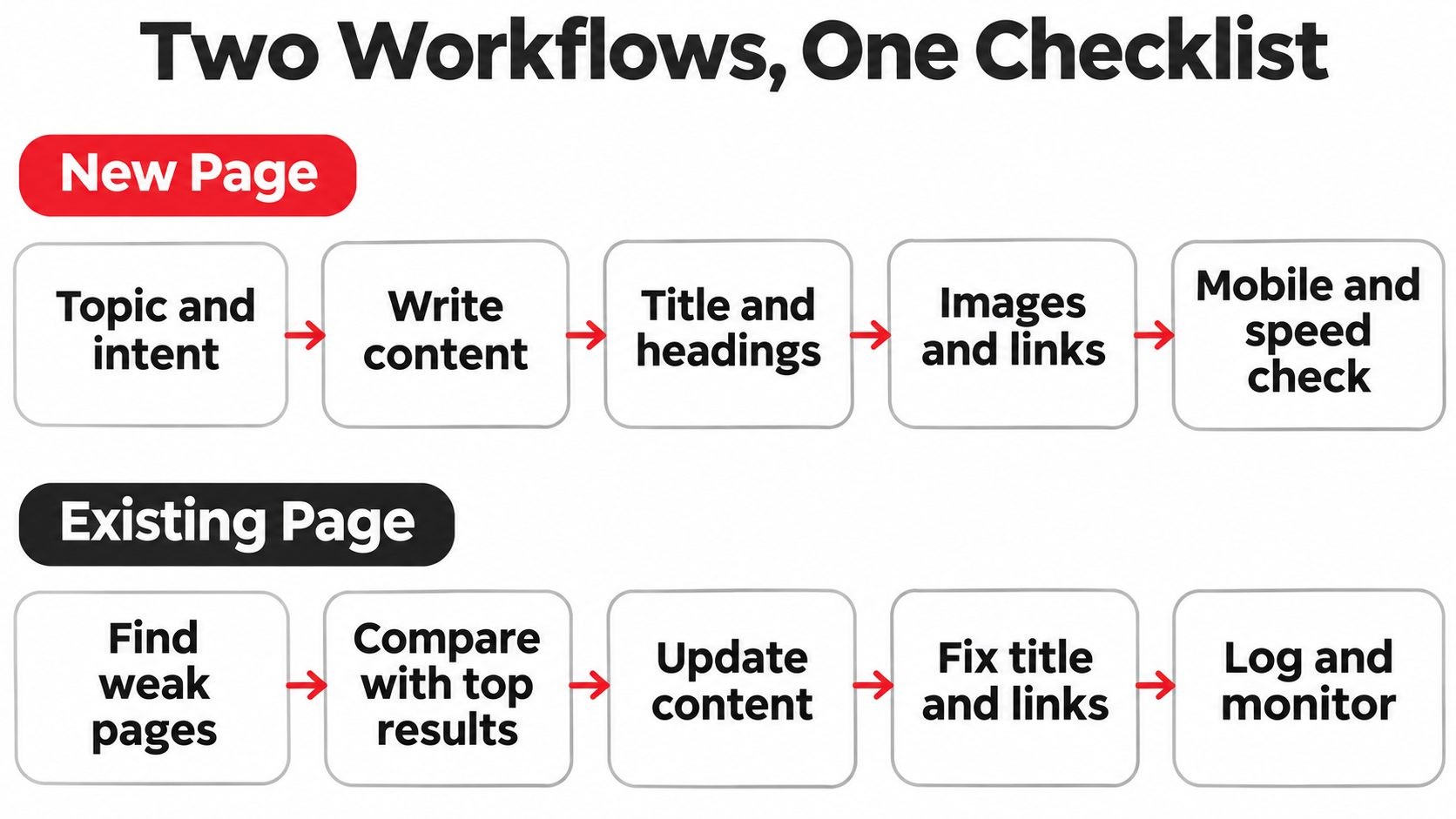
Pre-Publish Workflow for New Pages
It helps to work in the same order every time, so nothing gets forgotten.
Before you publish, run through this order. Confirm the topic and intent, write the content, add the title, description, and headings, optimize images, add internal links to and from the page, check mobile and speed, and preview how it looks. Then publish and request indexing in Search Console if you want it discovered sooner.
Do not skip the final preview. Many mistakes, like a missing image or a broken button, only show up on the live layout.
Refresh Workflow for Existing Pages
Old pages often hold the biggest opportunities. Start with pages that already get impressions but few clicks, or pages that slipped in rankings. Compare them with the pages that now rank above them. Update outdated facts, improve the title and description, add missing sections or examples, fix broken links, compress images, and add new internal links.
Record the date and what you changed. Then wait and watch. Google's SEO starter guide notes that changes can take anywhere from hours to months to show up in results, so avoid changing the same page again and again.
Common On-Page SEO Mistakes
Most of these mistakes are easy to fix once you know what to look for. Use the list below as a quick audit.
- Keyword stuffing. It makes content hard to read and does not help.
- Duplicate or missing titles. Every page needs its own clear title.
- No H1 or several H1s. Keep the structure clean.
- Ignoring search intent. The page answers a question nobody asked.
- Thin content. A few lines rarely satisfy anyone.
- Huge images. They slow the page and frustrate visitors.
- Broken links. They damage trust and waste crawling effort.
- Missing alt text. It hurts accessibility and context.
- Orphan pages. Pages with no internal links are hard to find.
- Set and forget. Pages go stale when nobody reviews them.
Tools to Check Your On-Page SEO
Free Page Checkers
A page checker can speed up your review by flagging common problems. The Website SEO Score Checker audits a single page against more than 60 on-page checks and gives you a score from 0 to 100, so you can see what to fix first. Use it as a guide, not a final verdict. A high score does not guarantee rankings, and a low score on one check does not always mean a real problem.
A smart way to use any checker is to scan your page, fix the top three issues, and scan again. Do not try to fix everything in one afternoon. Prioritize problems that affect many people, such as a missing title or a very slow page, over tiny details that make little difference.
Google Search Console
Search Console shows how your pages perform in Google, including impressions, clicks, and average position. Use it to find pages that need attention and to confirm that your changes helped. It is free and one of the most useful tools you can set up.
Manual Checks in the Browser
Some of the best checks need no tool at all. Open the page, read it as a visitor, test it on your phone, click every link, and view how it looks in search by searching for its exact title. A few minutes of careful looking often reveals what software misses.
Copy and Paste On-Page SEO Checklist
Use this condensed list for every page.
Content and intent
- The page matches search intent
- One clear primary topic and keyword
- Main keyword in title, first paragraph, and a heading
- Related phrases and questions covered
- Facts checked and up to date
- Author and sources shown where helpful
HTML elements
- Unique, specific title tag
- Unique meta description
- One H1 and logical H2 and H3 headings
- Short, readable URL
- Descriptive alt text on images
- Compressed images
- Relevant structured data, validated
Links
- Several relevant internal links out
- Links in from other pages
- A few trustworthy external links
- Descriptive anchor text
- No broken links
Page experience
- Fast loading
- Works well on mobile
- Clear call to action
- Trust signals visible
Local and maintenance
- Name, address, and phone consistent
- Reviews or proof shown honestly
- Date and review schedule noted
How to Measure Results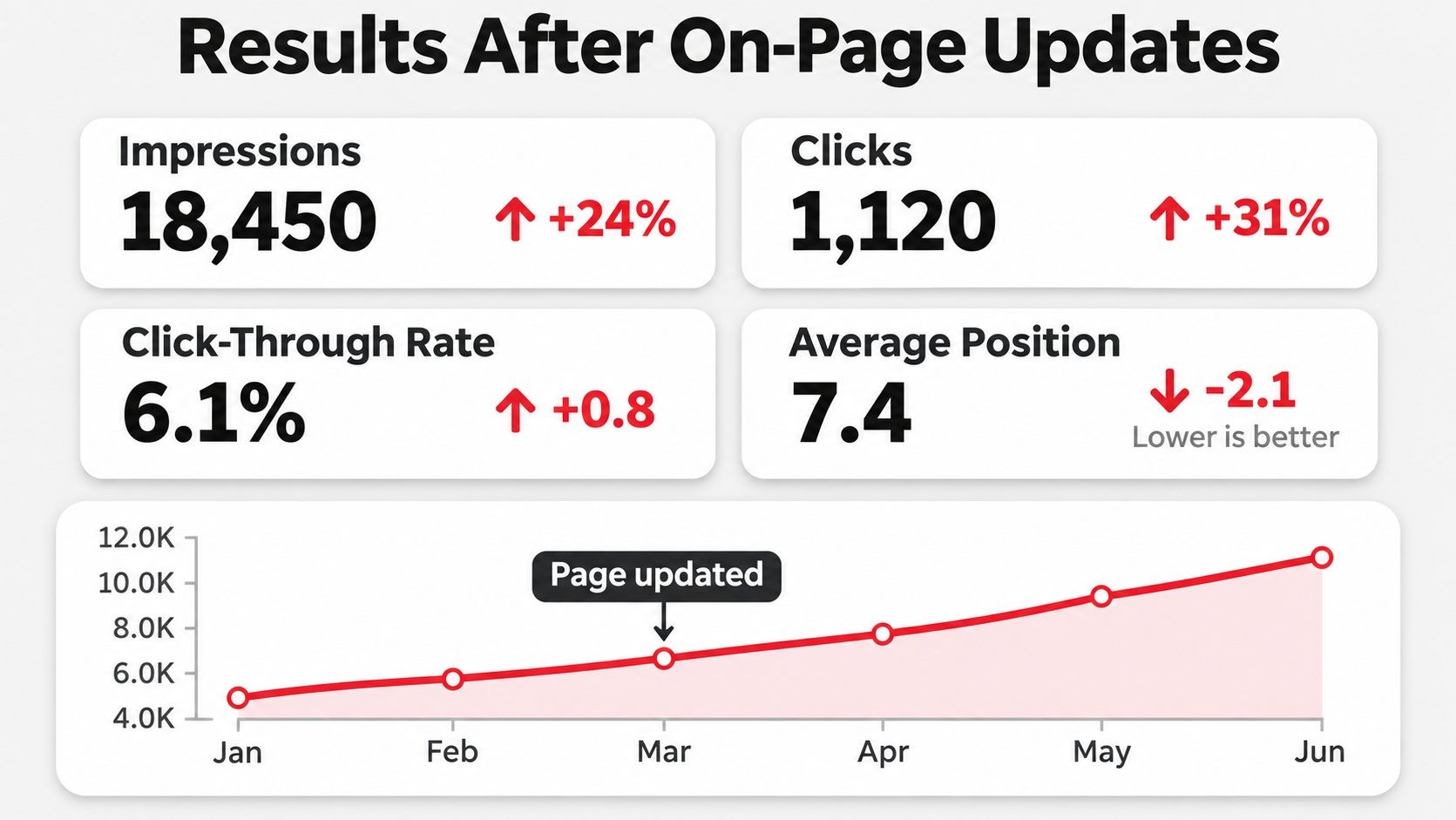
Use Google Search Console to track a few simple numbers for the page you changed.
- Impressions: How often the page appeared in search.
- Clicks: How many people visited from search.
- Click-through rate: Clicks divided by impressions.
- Average position: Where the page tends to rank.
Keep a simple log with the date, the page, and what you changed. For example, "June 3: rewrote title and meta description, compressed six images, added four internal links." When results move, you will know what probably caused it, and you can repeat the changes that worked on other pages.
Compare the same page before and after your update over the same number of days. Be patient. As noted earlier, results may take time, and rankings move for many reasons. If impressions rise but clicks do not, improve your title and description. If clicks rise but visitors leave quickly, improve the content and layout. Review your key pages every few months to keep them healthy.
FAQs
Conclusion
A strong page is rarely the result of one clever trick. It comes from many small details done well: content that matches intent, clear titles and headings, tidy URLs, optimized images, helpful links, fast loading, and a layout that makes the next step obvious.
Start with your most important page today. Walk through the checklist, fix the weakest items first, and run a quick scan with the Website SEO Score Checker to confirm you did not miss anything. Then repeat the process for your next page. Over time, those small, steady improvements add up to a site that search engines understand and visitors enjoy.
No Tags


Comments (0)