
It is a Tuesday afternoon, and someone's kitchen sink has started leaking. They grab their phone and type "plumber near me." Within seconds they see three businesses on a map, a few reviews, and a phone number they can tap. They call one of them, and the other plumbers never even know they lost the job.
That quiet moment plays out thousands of times a day, and it is exactly what local SEO is built for. If you run a small business that serves customers in a specific area, local SEO helps you show up when those people search. This guide walks you through what it is, how it works, and a practical nine-step plan you can follow without a big budget. If you are still building your overall plan, our guide to digital marketing for small business is a good companion read.
Key Takeaways
- Local SEO helps your business appear in map results and "near me" searches, so nearby customers can find you.
- Google says local results depend mainly on relevance, distance, and prominence, which means a complete profile, good reviews, and a strong website all matter.
- Your three biggest priorities are a complete Google Business Profile, consistent business details everywhere, and a steady stream of genuine reviews.
- You can start for free, expect early signs within a few months, and keep improving over time.
- Measure calls, direction requests, and website clicks, not just rankings.
What Is Local SEO?
Local SEO is the practice of improving your online visibility so that your business appears in searches tied to a place. That includes searches that name a city or neighborhood, searches with "near me," and searches where Google assumes the person wants something close by.
A Simple Definition
Think of local SEO as making sure Google knows three things about your business: what you do, where you do it, and why people trust you. When those signals are clear and consistent, Google is more comfortable showing you to nearby customers who are ready to buy.
Local SEO vs Traditional SEO
Traditional SEO tries to rank your pages for searches no matter where the searcher is. Local SEO focuses on searchers in a particular area and on the places those searches show results, such as maps. Many of the basics overlap, but the priorities are different.
| Factor | Traditional SEO | Local SEO |
|---|---|---|
| Goal | Rank pages for broad searches | Appear for nearby customers |
| Main battleground | Organic results | Map results and the local pack |
| Key asset | Website content and links | Google Business Profile, reviews, and listings |
| Location | Less important | Central to every result |
| Best for | Online and national businesses | Shops, clinics, and service businesses |
What Local Search Results Look Like
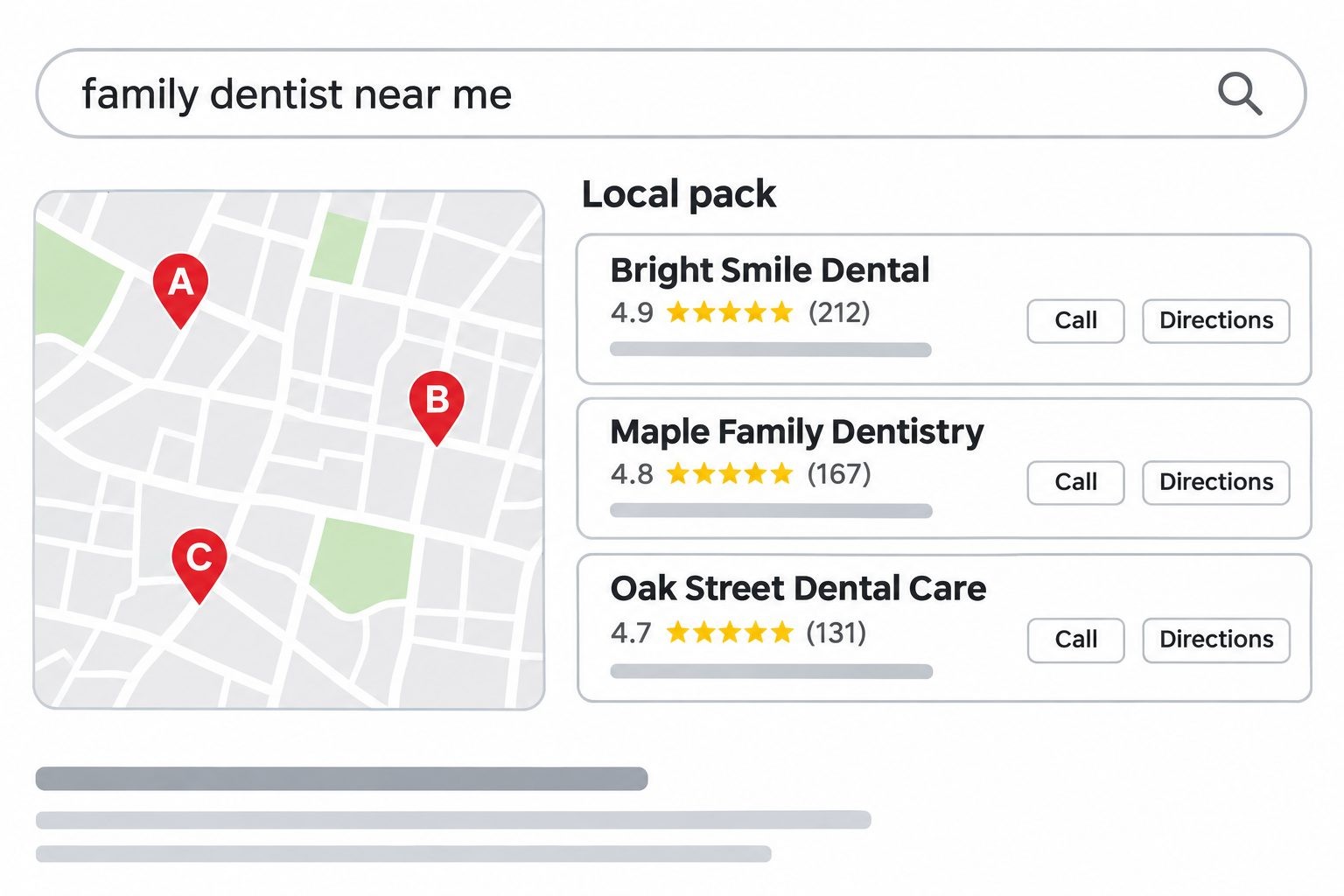
When a search has local intent, Google often shows three parts. At the top you may see ads. Below them comes the local pack, a short list of three businesses shown with a map. After that come the regular organic results, plus the larger Google Maps view that people can open to see more. Getting into the local pack is one of the biggest wins in local SEO, because it puts your name, rating, and contact buttons directly in front of searchers.
The two areas are judged somewhat differently. Map and local pack results lean heavily on your Google Business Profile, reviews, and your distance from the searcher. Regular organic results lean more on your website pages and the links pointing to them. A business that wants to win local customers needs to be strong in both places, which is why this guide covers your profile and your website side by side.
Why Local SEO Matters for Small Businesses
It Reaches Nearby Customers Who Are Ready to Act
Someone searching "emergency dentist near me" is not browsing. They want help now. Local SEO puts you in front of people at that moment of need, which is very different from interrupting strangers with an ad.
It Is Cost-Effective
Many of the most important local SEO tools are free, including a Google Business Profile, directory listings, and review requests. You invest time and effort instead of large ad budgets, and the results keep working after you stop.
It Builds Trust and Credibility
A complete profile, accurate details, and a strong set of reviews tell customers you are a real, reliable business. Trust is often the deciding factor between two similar options.
It Lets Small Businesses Compete With Bigger Brands
A large chain may have more money, but you can be more local, more personal, and more responsive. Because local results depend on relevance and distance, a small neighborhood business can outrank a famous brand for nearby searches.
Results Compound Over Time
Every new review, accurate listing, and helpful page adds to your strength. Unlike a paid ad that disappears when the budget ends, these assets keep supporting your visibility month after month.
How Google Ranks Local Results
You do not need to know every detail of how Google works, but understanding the main ideas helps you focus on what matters.
Relevance, Distance, and Prominence
Google states that local results are based mainly on three factors. Relevance is how well your profile matches what someone is searching for. Distance is how far you are from the searcher or the location they named. Prominence is how well known and trusted your business is, which can include reviews, links, articles, and information from across the web. You can read Google's own explanation of how Google determines local ranking.
You cannot change distance, but you can improve relevance by completing your profile and website content, and you can build prominence through reviews, listings, and mentions.
Other Signals: Reviews, Citations, and Website Quality
Beyond those three ideas, several practical signals help. Reviews show real customer experience. Citations, which are mentions of your business name, address, and phone number on other sites, confirm that your details are accurate. Your website supports everything by explaining what you offer and where you serve. Each of these strengthens the others, so the best results come from improving them together.
The 3-Pack and Maps
The local pack and Maps are where many local customers make their choice. People often look at the star rating, the number of reviews, the photos, and the hours before they ever visit a website. That is why your profile and reviews deserve as much attention as your site.
You can see this for yourself with a simple test. Search for your main service in your town while standing in different parts of it, or ask a friend in another neighborhood to do the same. You will often see different businesses in the top three. That variation is normal, and it explains why a business can rank well near its shop and poorly a few miles away.
Before You Start: Audit and Setup
A short audit before you begin saves time and shows you where the biggest gaps are.
Check Your Current Local Visibility
Search for your main service plus your city, using a private browser window, and note where you appear. Search for your business name too. Then run a quick check of your website with a tool such as SEO Site Checker to spot slow pages, missing titles, and other basics that hold local rankings back. Write down what you find. You will use it as your starting point.
Look at Three Local Competitors
Find the three businesses that appear most often when you search. Look at their ratings, review counts, photos, categories, and websites. You are not copying them. You are learning what a strong profile looks like in your market and where you can do better.
Set a Goal and Record Your Baseline
Choose a simple goal, such as "double my monthly calls from Google within six months." Then record your starting numbers, such as calls, direction requests, review count, and website visits. Without a baseline, you cannot prove progress.
How to Do Local SEO: 9 Steps
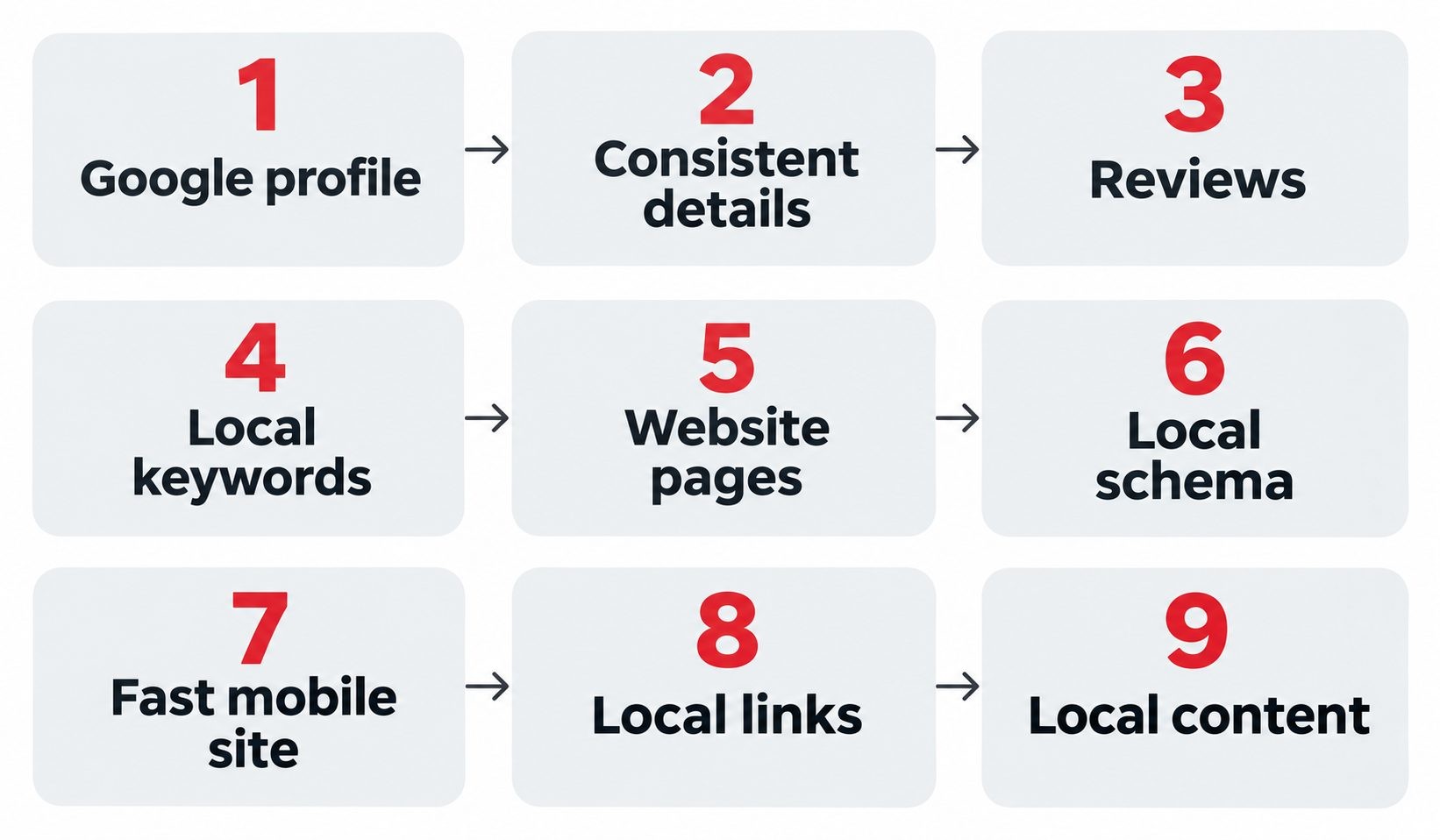
Work through these steps in order. The first three give you the biggest return for the least effort, so even if you stop there, you will be far ahead of many competitors.
Step 1. Claim and Optimize Your Google Business Profile
Your Google Business Profile is the free listing that controls how you appear in Google Search and Maps. For most local businesses, it is the single most important asset.
Start by claiming and verifying your profile so that you control the information. Then complete every section:
- Business name: use your real, everyday name exactly as customers know it. Do not stuff it with keywords or locations, because Google's rules do not allow it.
- Categories: choose the most accurate main category, then add secondary categories that truly describe your services.
- Services and products: list what you offer in plain language, with short descriptions.
- Hours: keep regular and holiday hours accurate, since wrong hours frustrate customers and lead to bad reviews.
- Service area or address: show your address if customers visit you, or your service area if you travel to them.
- Photos: upload real images of your storefront, team, and finished work, and add new ones regularly.
- Description: write a clear summary of what you do and who you help.
Once the basics are done, keep the profile alive. Post updates about offers and events, answer questions that people ask, and respond to messages quickly. A profile that looks active tells customers you are open and caring. Also look for extra features that suit your business, such as attributes like wheelchair accessible or online appointments, a booking or menu link, a products section, and messaging. Each one answers a customer question before they have to ask it. Read the Google Business Profile guidelines carefully, because breaking the rules, even by accident, can get a profile suspended.
Step 2. Fix NAP Consistency and Build Citations
NAP stands for name, address, and phone number. A citation is any place online that mentions those details, such as a directory, a chamber of commerce page, or a social profile. Search engines compare these mentions to confirm that your business is real and that your details are correct.
The golden rule is consistency. Use the exact same name, address, and phone number everywhere, down to small things like "Street" versus "St." and suite numbers. If you have moved, changed phone numbers, or rebranded, find and fix the old mentions, since mismatches can confuse both customers and search engines.
Start with the major platforms for your region, then add directories for your industry and your local community. Quality beats quantity, so aim for accurate listings on trustworthy sites instead of hundreds of low-quality ones.
A simple way to audit your citations looks like this:
- Write down your correct business name, address, phone number, website, and hours in one master document.
- Search for your phone number and business name to find existing listings, including old ones.
- Compare each listing with your master document and note every difference.
- Update or remove the wrong ones, and claim any listing you have not yet taken control of.
- Save your master document so you can use the exact same details for every new listing.
This takes an afternoon, but it prevents a lot of confusion later. A common example is a business that moved two years ago, where one old directory still shows the previous address and sends customers to the wrong place. To see how listings and rankings reinforce each other, read how local SEO and business listings work hand in hand, and learn why online directories still matter even as search keeps changing.
Step 3. Get and Manage Reviews
Reviews are some of the strongest signals in local search, both for customers and for rankings. Shoppers read them before they call, and Google lists review information in your profile.
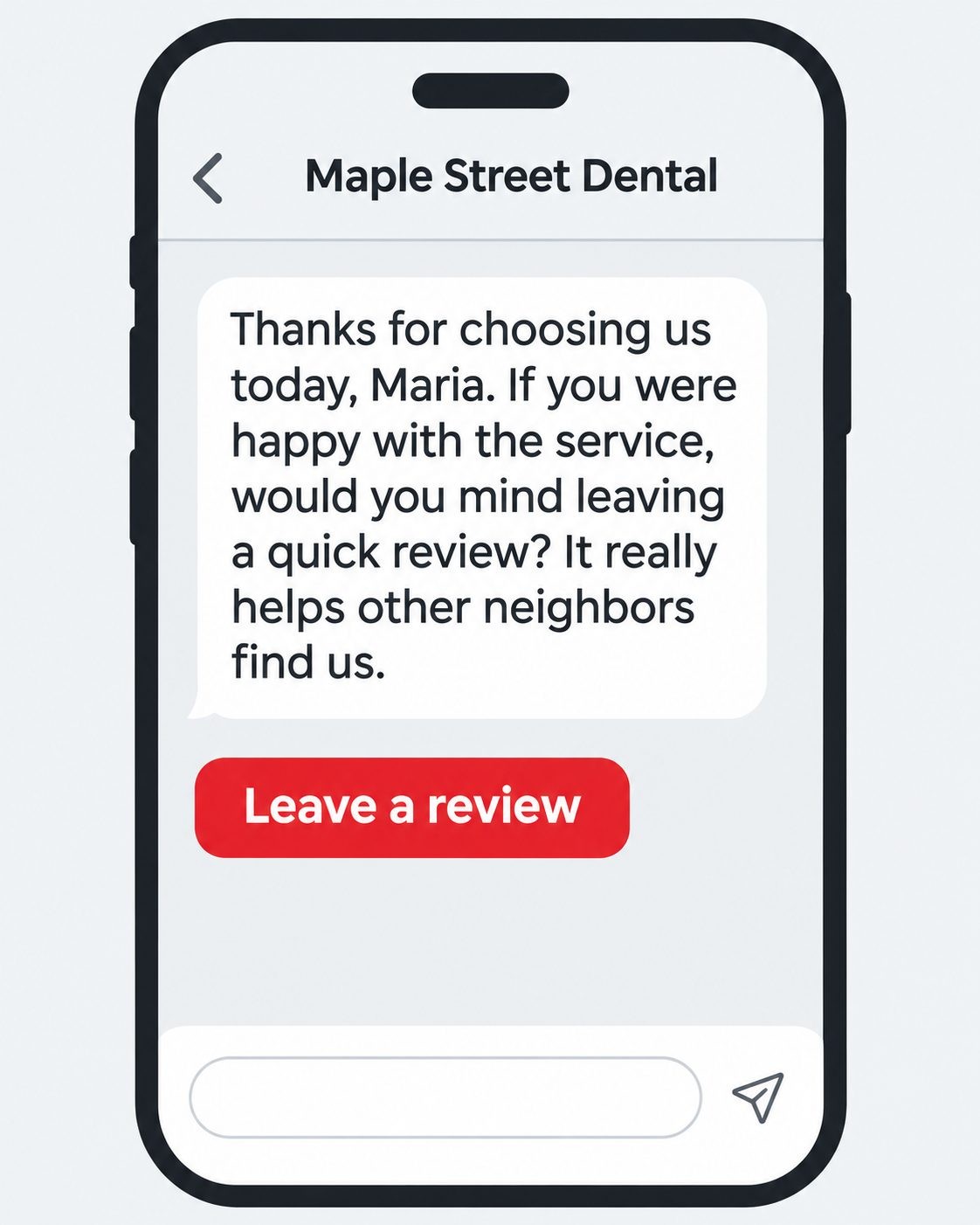
To collect more, ask at the right moment, which is right after a good experience. Send a direct link by text or email so leaving a review takes seconds, and train your team to mention it politely. Do not offer rewards in exchange for positive reviews, and never write fake ones.
A short, friendly request works best. For example: "Thanks for choosing us today, Maria. If you were happy with the service, would you mind leaving a quick review? It really helps other neighbors find us. Here is the link." Keep it personal, and send it within a day of the visit while the experience is fresh.
For a negative review, stay calm and specific. A good reply might say: "We are sorry the appointment ran late. That is not the experience we want for you. Please call us at the number on our profile so we can make it right." Replies like this show future customers how you treat people when something goes wrong.
Reply to every review. Thank people for kind words, and answer criticism calmly, with an apology where it is deserved and an offer to fix the problem. Future customers read your replies too, and a thoughtful response to a bad review can build more trust than a spotless record. You can collect reviews on Google, and also on independent platforms such as Clutchpilot, which gives customers another place to find and rate businesses. For more ideas, see how to build trust online with reviews.
Step 4. Research Local Keywords
Local keywords are the phrases your customers type when they look for what you offer in your area. They often combine a service with a place, such as "emergency plumber in Tulsa" or "family dentist near Maple Park."
To find them, start with your own services and think about how customers describe their problems. Check Google's suggestions as you type, look at the "People also ask" box, and review the search terms that already bring visitors in your Search Console report. Note which phrases signal strong buying intent, such as "emergency," "same day," or "near me." Then group your keywords by service and by area, and give each important group its own page.
Here is a simple example for a family dental clinic in a mid-sized city. Its main keyword groups might be "family dentist" plus the city, "emergency dentist near me," "teeth whitening" plus the city, and "dental implants" plus the city. Each group gets its own service page, and the emergency page highlights same-day appointments and a prominent phone number. Notice how each page serves a different customer need, instead of one page trying to do everything.
Step 5. Optimize Your Website Pages for Local Search
Your website supports your profile by explaining what you offer and where you serve. Make sure each main service has its own page, written for the people who search for it.
On every key page, include a clear title that features the service and the place, such as "Emergency Plumbing in Tulsa | Your Business Name." Write a short, inviting meta description, and use headings that match what customers ask. Mention your city and neighborhoods naturally, add your phone number where it is easy to see, and include real photos and customer reviews. Embedding a map on your contact page is a helpful touch as well.
A quick checklist for each service page can keep you on track:
- A clear headline that names the service and the area.
- Two or three short paragraphs describing the service in plain language.
- A short list of what is included and how the process works.
- Real photos from your own work.
- One or two customer reviews related to that service.
- A prominent phone number and a simple contact form.
- A few answers to the most common customer questions.
If you serve several towns, create a separate page for each area only when you can give each one real, useful information. Copying the same text and swapping the city name creates thin pages that do not help anyone. For a practical checklist, see our guide to on-page SEO techniques that actually work.
Step 6. Add LocalBusiness Schema
Schema markup is a small piece of code that tells search engines about your business in a format they can read easily. The LocalBusiness type lets you share your name, address, phone number, opening hours, and more. It does not guarantee higher rankings, but it removes guesswork and helps search systems understand who you are.
Google explains how to set this up in its documentation on LocalBusiness structured data. Most website platforms and SEO plugins can add it for you without writing code. After you add it, test your pages and fix any errors. A site checker such as SEO Site Checker can also help you spot technical problems that interfere with how your pages are read. Make sure the details in your markup match your Google Business Profile exactly. At a minimum, include your business name, address, phone number, website, opening hours, and a logo or image. If you accept reviews on your own site, follow Google's guidelines for how those can be marked up, and never mark up reviews that visitors cannot actually see.
Step 7. Make Your Site Fast and Mobile-Friendly
Most local searches happen on phones, often while people are out and about. If your site is slow or awkward on a small screen, they will leave and call the next business on the list.
Test your pages on a real phone. Text should be readable without zooming, buttons should be easy to tap, and the page should load quickly. Compress large images, remove heavy plug-ins you do not need, and use a reliable host. Add a click-to-call button near the top of the page so mobile visitors can reach you with one tap, and make sure your site uses HTTPS. A short speed checklist can help:
- Resize and compress images before uploading them.
- Remove plug-ins, widgets, and scripts you no longer use.
- Use a reliable host and a lightweight theme.
- Avoid pop-ups that cover the whole screen on phones.
- Keep your most important button, such as "Call now," visible without scrolling.
Step 8. Earn Local Links and Mentions
Links and mentions from other trusted local sources show that your business is part of the community, which supports prominence. The best ones come naturally from real relationships.
Ideas that work for small businesses include joining your local chamber of commerce, sponsoring a youth team or community event, partnering with complementary businesses, offering a helpful quote or tip to a local journalist, and getting listed on local association pages. Avoid buying links or joining link schemes, since these can harm your rankings. A few genuine local links are worth far more than dozens of questionable ones.
Other practical ideas include hosting a free workshop, supporting a local charity and asking to be mentioned on their site, sharing a customer success story with a local blog, and contributing to a community newsletter. Each of these puts your name in front of real local people while also creating a reputable link back to you. Start with two or three relationships you already have, since those are the easiest to turn into a mention.
Step 9. Publish Helpful Local Content
Content proves that you know your field and gives people more reasons to find you. Focus on what your local customers actually need.
Good ideas include a guide to common problems in your area, a seasonal checklist, a page answering your top customer questions, a project gallery that shows real local work, and a simple "what to expect" page for first-time customers. For example, a heating contractor might publish "How to prepare your home for a cold snap in Denver." Content like this attracts local readers, earns links, and gives you something useful to share on your profile.
You do not need to publish constantly. A realistic plan is one solid local page or article each month, plus a short update on your profile each week. Choose topics from the questions customers actually ask you on the phone and in person. If you hear the same question three times, it deserves its own page.
Local SEO for Different Types of Business
The basics are the same for everyone, but the details change depending on how you serve customers.
Service-Area Businesses
If you travel to customers, such as plumbers, cleaners, or mobile mechanics, you may not want to show your home address. In your Google Business Profile, you can set a service area instead. Create website pages for the main areas you truly serve, with real local details, and be honest about the areas you cover, since stretching your claims invites problems.
Businesses With Multiple Locations
Each location should have its own Google Business Profile and its own website page with unique information, such as the local address, hours, staff, photos, and reviews. Keep names and details consistent, and avoid copying the same text across pages. Managing each location carefully matters more than adding more of them. For example, a three-location bakery should show each shop's own hours, its own photos, and reviews from that neighborhood, instead of one combined page that leaves customers unsure which shop to visit.
Home-Based and Brand-New Businesses
If you work from home or you have just started, focus first on the free foundations: a verified profile, accurate listings, and your first reviews. You may not rank for the most competitive searches at the start, so target specific services and smaller neighborhoods first, then expand as your reviews and reputation grow.
Local SEO in the Age of AI Search
Search is changing. Many results pages now include AI-generated summaries, map results, and ads above the regular links. People also ask AI tools for recommendations such as "best bakery near me." These systems draw on information they can find and trust.
For a small business, that makes the same basics even more valuable. Keep your name, address, phone number, hours, and services accurate everywhere. Earn real reviews that describe what you do well. Publish clear pages that answer common questions directly. Make sure your site and profile say the same things. None of this requires special tricks, and it helps both traditional and AI-driven search.
How to Measure Local SEO Results
You cannot improve what you do not track, and the best local SEO tools are free.
Key Metrics to Watch
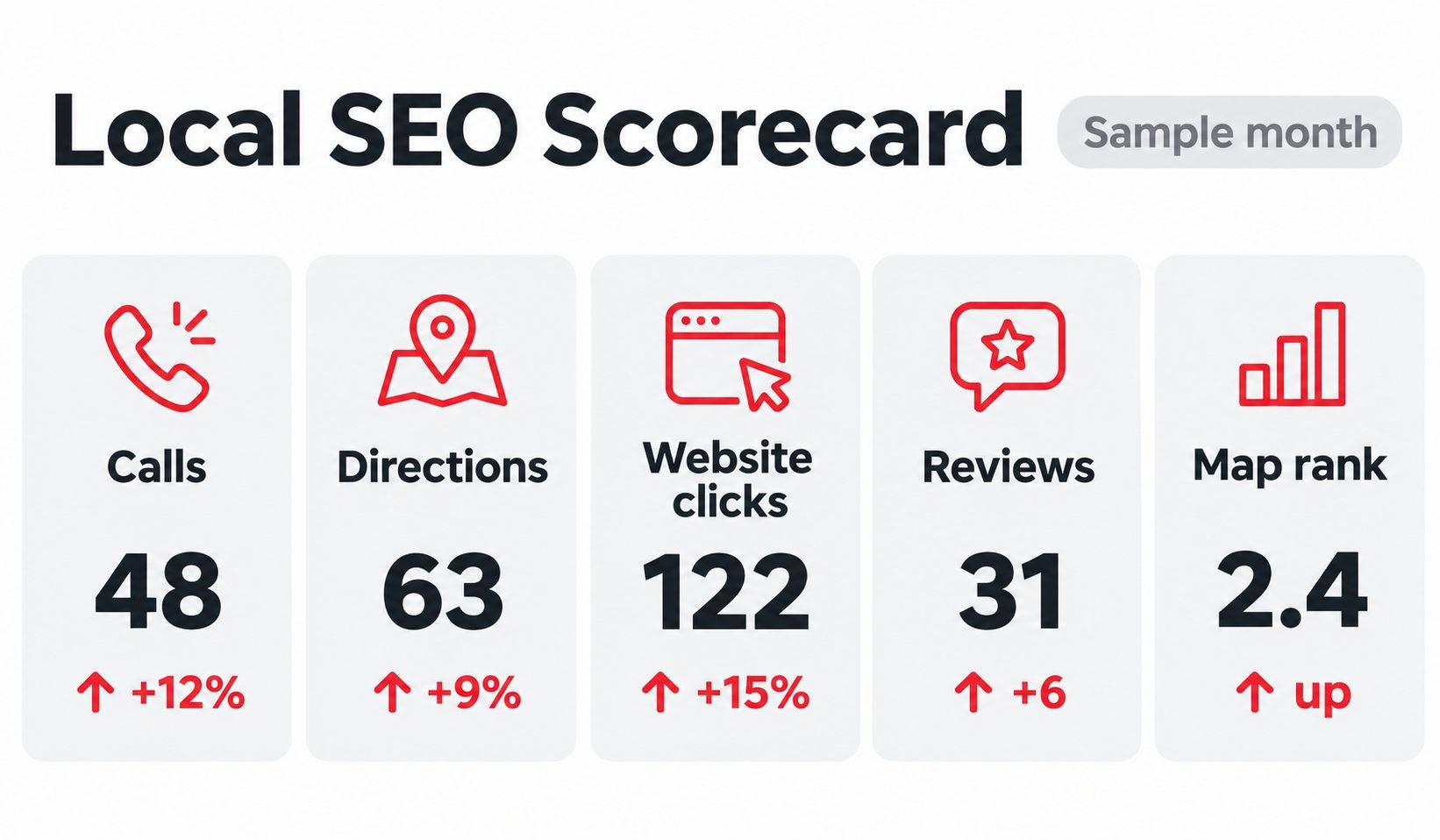
Focus on numbers that connect to real business results:
- Calls: phone calls from your Google Business Profile and website.
- Direction requests: people who asked for directions to your location.
- Website clicks: visits to your site from your profile and search results.
- Review count and average rating: a simple measure of trust and momentum.
- Local keyword positions: where you appear for your main service and location searches.
Free Tools to Use
Your Google Business Profile includes insights about views, searches, calls, and direction requests. Google Analytics 4 shows how visitors behave on your site, and Google Search Console shows which searches bring people to you and whether Google can read your pages. To see your local rankings fairly, search from different spots in your service area, since results change with the searcher's location.
A helpful trick is to add a tracking tag, called a UTM parameter, to the website link in your Google Business Profile. That way Google Analytics can show you how many visitors came from your profile instead of mixing them with other traffic. It takes a few minutes to set up and gives you a much clearer picture of what your profile is worth.
A 30-Minute Monthly Routine and What Good Looks Like
Once a month, open your profile insights and note calls, directions, and clicks. Check Search Console for the searches that bring visitors. Count new reviews and reply to any you missed. Write the numbers in a simple sheet and compare them with your baseline. Good progress looks like steady growth in calls and direction requests, a rising review count, and more impressions for your local searches, even when single rankings bounce around. Pick one improvement to make the next month.
How Much Does Local SEO Cost and How Long Does It Take?
Cost: DIY, Freelancer, and Agency
Costs vary widely, so I will not quote one number. The honest answer depends on your market and how much you do yourself. Doing it yourself costs the least in money but the most in time, and many of the basics, such as your profile, listings, and review requests, are free. Hiring a freelancer works well for specific jobs, such as a website fix or listing cleanup. Hiring an agency suits larger budgets or businesses with several locations. Whatever you choose, ask for a clear scope, a monthly report, and an explanation of what will be done.
Several things affect the final cost. The more competitive your industry and city, the more effort it takes to stand out. The number of locations you manage multiplies the work. The state of your current website and listings changes how much cleanup is needed. And the amount of content, review management, and link building you want adds to the scope. Understanding these factors helps you compare quotes fairly.
Timeline: When to Expect Results
Local SEO is faster than many people expect, but it is not instant. Small fixes, such as completing a profile or correcting a phone number, can improve how you appear within weeks. Building reviews, links, and rankings takes longer, often several months of steady effort. Competition, your starting point, and how consistently you work all affect the pace. Treat it like fitness, where consistent habits matter more than one big push.
DIY or Hire a Local SEO Pro?
Start yourself if you have the time and a small budget, because it teaches you how your customers search. Consider hiring help when you are too busy to keep up, when you manage several locations, or when you are stuck despite doing the basics.
If you hire, ask questions. What exactly will you do each month? How will you report results? Who owns the profile and accounts if we part ways? Can you show examples from similar businesses? Be cautious of anyone who guarantees the number one spot, because no one controls Google's results. Reading independent reviews is a smart step, and you can browse marketing and advertising businesses on Clutchpilot's marketing and advertising category to compare options.
Common Local SEO Mistakes to Avoid
- Leaving your profile unclaimed or unverified. Others may suggest changes, and you miss the easiest local win.
- Using inconsistent details. Different names or phone numbers across the web confuse customers and search engines.
- Stuffing keywords into your business name. It breaks Google's rules and can lead to suspension.
- Buying or faking reviews. Platforms remove them, and customers can usually spot them.
- Ignoring duplicate listings. Extra profiles for the same business split your signals and cause confusion.
- Neglecting mobile visitors. A slow, awkward site loses people who were ready to call.
- Never updating hours or photos. Out-of-date information is one of the fastest ways to lose trust.
The encouraging part is that almost every mistake on this list is fixable, and many take less than an afternoon. If you only have time for a few, start with your profile, your details, and your reviews, because they affect both rankings and customer trust the most.
Local SEO Checklist
Use this list to track your progress:
- Claim and verify your Google Business Profile.
- Complete every section and add real photos.
- Make your name, address, and phone number identical everywhere.
- Build accurate listings on key directories.
- Ask for reviews and reply to every one.
- Research local keywords and group them by service and area.
- Optimize titles, headings, and service pages.
- Add LocalBusiness schema and test it.
- Make your site fast and easy to use on a phone.
- Earn local links and publish helpful local content.
- Check your numbers every month.
Free and Low-Cost Local SEO Tools
- Business profile data: the insights inside your Google Business Profile.
- Analytics: Google Analytics 4 and Google Search Console.
- Website checks: SEO Site Checker for quick technical and on-page reviews.
- Keyword ideas: Google's search suggestions, the "People also ask" box, and free keyword tools.
- Design and photos: Canva for simple graphics, and your own phone for real photos.
Check current pricing before you commit, because free plans and features change often.
Frequently Asked Questions
Conclusion: Start With the Basics and Keep Going
Local SEO is not a mystery, and it is not only for big companies. It is a set of practical habits: a complete Google Business Profile, consistent details, genuine reviews, a helpful website, and steady attention to the numbers. Each step makes it easier for nearby customers to find you and choose you.
This week, do three things. Claim and complete your Google Business Profile, check that your name, address, and phone number match everywhere, and ask your next happy customer for a review. When you are ready to go deeper, our upcoming complete local SEO guide will cover the advanced topics.
No Tags


Comments (0)