
Picture this. A neighbor mentions your business over dinner, and the next thing they do is pull out a phone and search your name. What they find in the next thirty seconds decides whether they call you, visit you, or move on to someone else.
That moment happens every day, and it is why an online presence for small business matters so much. The good news is that you do not need a big budget or a technical background to build one. In this guide, you will learn what an online presence is, why it matters, and how to build one in ten clear steps, starting with the free basics.
Key Takeaways
- An online presence is everything people can find about your business on the internet, not just a website.
- The core pieces are a website, a Google Business Profile, directory listings, reviews, and one or two social accounts.
- Consistent details, such as your name, address, phone number, and hours, build trust and help you rank locally.
- You can start for free, then improve step by step and measure what brings customers.
What Is an Online Presence?
An online presence is the sum of everything customers can see, read, and learn about your business on the internet. It includes the places you control, such as your website, and the places you do not fully control, such as review sites and search results.
A Simple Definition
Think of your online presence as your business's digital front door. It is how you appear when someone searches for your name, your service, or your location. A strong presence makes it easy for the right people to find you, understand what you do, and feel confident about contacting you.
Online Presence vs Digital Marketing
These two ideas are related, but they are not the same. Your online presence is the foundation, meaning the website, listings, reviews, and profiles that represent you. Digital marketing is the set of activities you use to promote that foundation, such as ads, email campaigns, and content publishing. You need the foundation first, because marketing sends people to your presence, and a weak presence wastes that traffic. When you are ready for the next level, read our guide to digital marketing for small business.
What Customers Check Before They Contact You
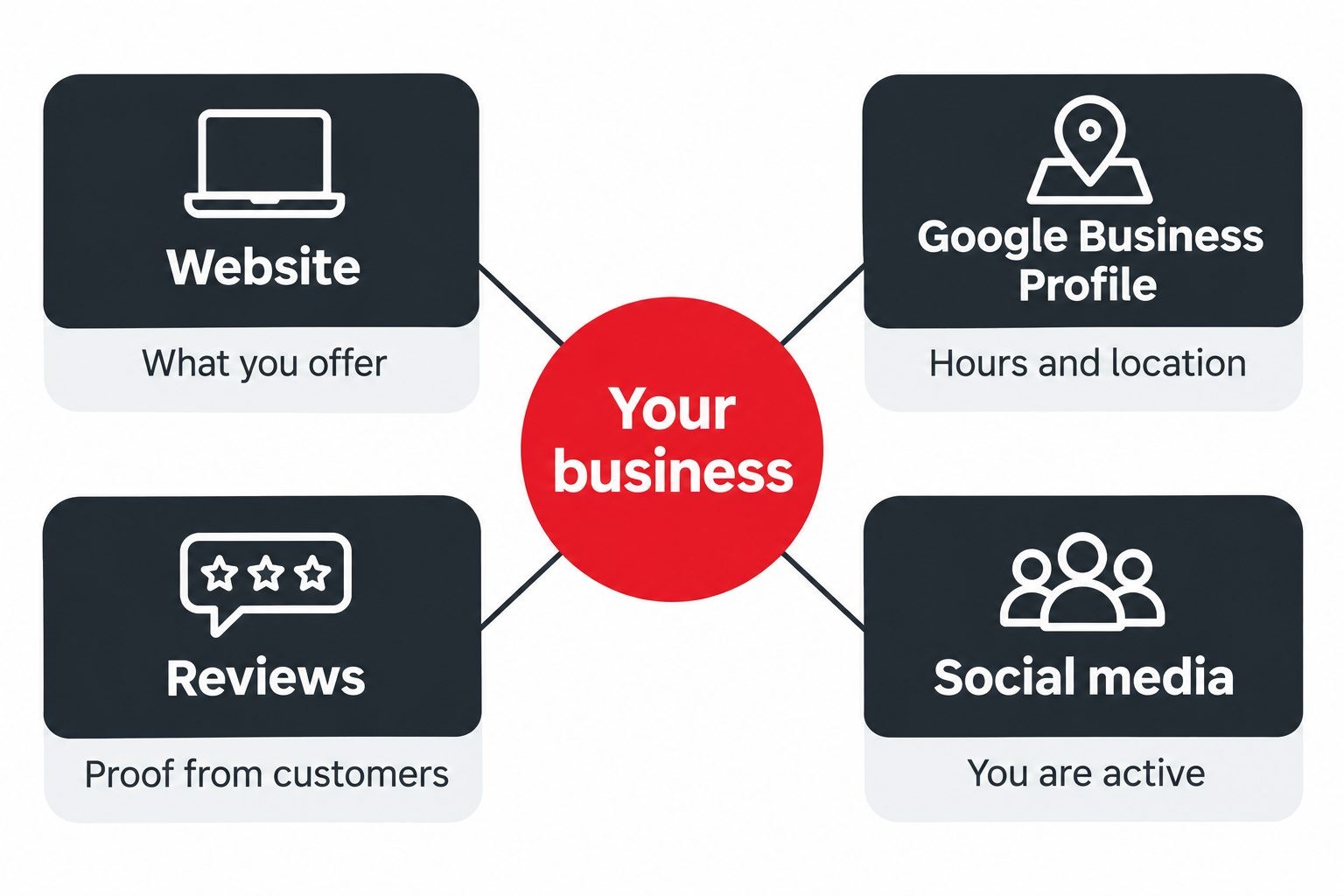
Most people do a quick check before choosing a local business. They look at your website to see what you offer, your Google listing for hours and location, your reviews for proof that others were happy, and sometimes your social media to see if you are active. If any of these are missing, outdated, or contradictory, trust drops fast. Fixing these four places covers most of what customers look for.
Why an Online Presence Matters for Small Businesses
Customers Search Before They Buy
People now research almost everything online first, from plumbers to bakeries. If your business does not appear, a competitor gets the call.
It Builds Credibility and Trust
A professional website, accurate listings, and real reviews tell visitors you are an established, reliable business. Without them, even a great company can look uncertain.
It Works While You Are Closed
Your website and listings answer questions at midnight, on weekends, and on holidays. They share your hours, services, and contact details even when you cannot pick up the phone.
It Helps You Compete With Bigger Brands
A large company can outspend you, but it cannot be more local or more personal than you. A well-built online presence lets you win on relevance, reviews, and service.
Before You Start: Plan Your Presence
A little planning saves a lot of rework. Spend an hour on these four decisions before you build anything.
Set a Clear Goal
Decide what you want your online presence to do. You might want more phone calls, more bookings, more store visits, or more online orders. A specific goal, such as "get 15 new quote requests per month," tells you which pages and tools matter most.
Know Who You Want to Reach
Write a short description of your ideal customer. Note where they live, what problem they have, and how they look for help. A busy parent searching on a phone needs a very different experience from a business owner comparing suppliers.
Choose a Consistent Name, Logo, Colors, and Voice
Pick one version of your business name and use it everywhere. Choose a simple logo, two or three colors, and a friendly tone for your writing. Consistency makes you look professional and helps people recognize you across different places.
Check Your Business Name and Handles
Before you commit, make sure your preferred domain name and social media handles are available. Try to use the same name or something very close on every platform, so customers can find you easily.
How to Build an Online Presence: 10 Steps
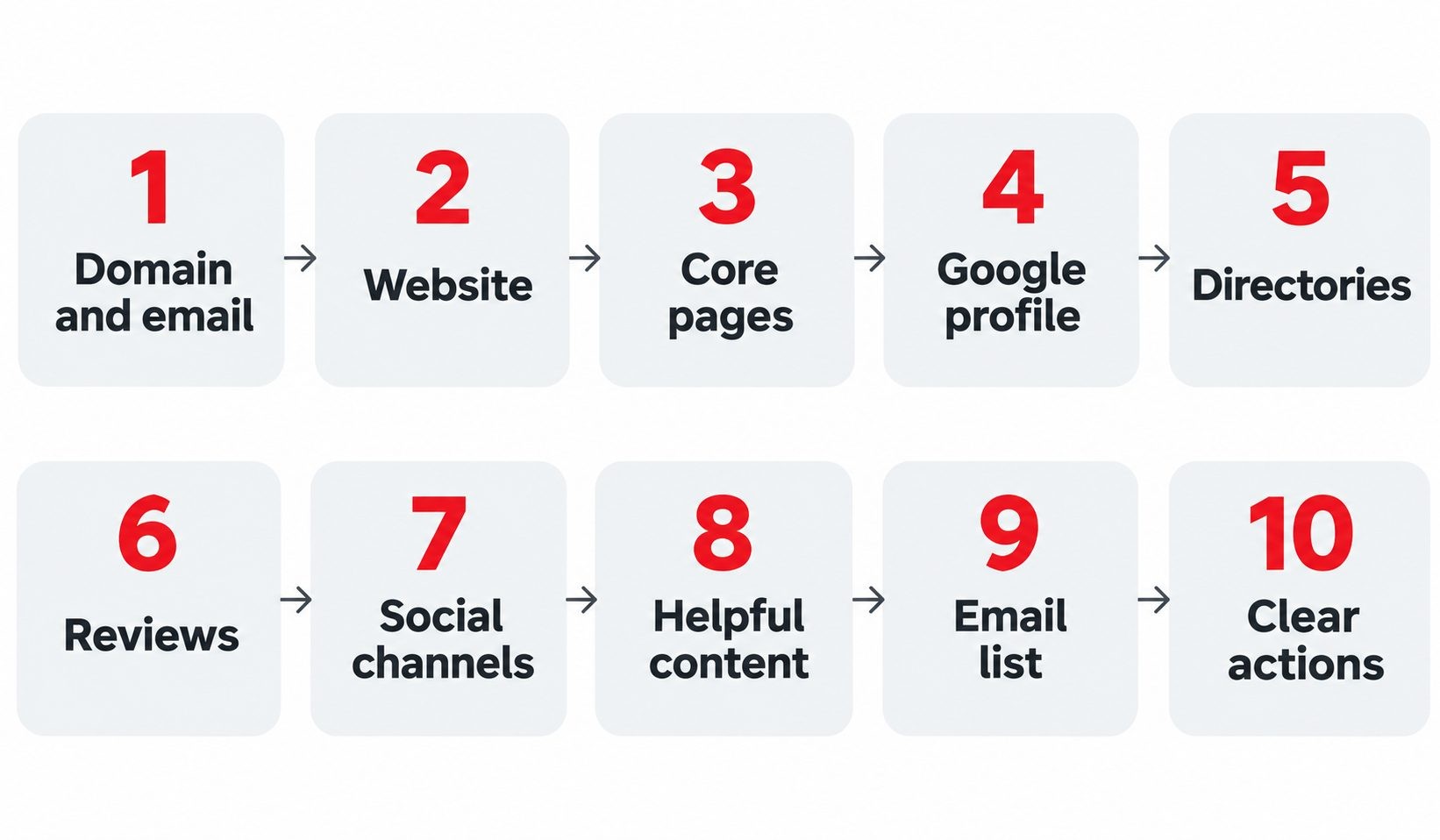
Work through these steps in order. Each one builds on the last, and the first six give you a solid presence even if you stop there.
Step 1. Get a Professional Domain and Business Email
Your domain name is your address on the internet, so choose one that is short, easy to spell, and close to your business name. Then set up an email address that uses it, such as hello@yourbusiness.com. A custom email looks far more trustworthy than a free webmail address, and it costs very little each month.
Step 2. Build a Simple, Fast, Mobile-Friendly Website
Your website is the one place online that you fully own, so it deserves the most care. It does not need to be fancy. It needs to load quickly, look clean on a phone, and answer three questions right away: what you do, who you serve, and how to contact you.
You can build one with a website builder, a WordPress theme, or a freelance designer, depending on your budget and comfort level. Whichever route you take, keep the design simple and avoid heavy images and pop-ups that slow pages down. Make sure your site uses HTTPS, which shows the padlock in the browser and protects visitors' information. Finally, test it on your own phone. If you have to pinch and zoom to read anything, fix that before launch.
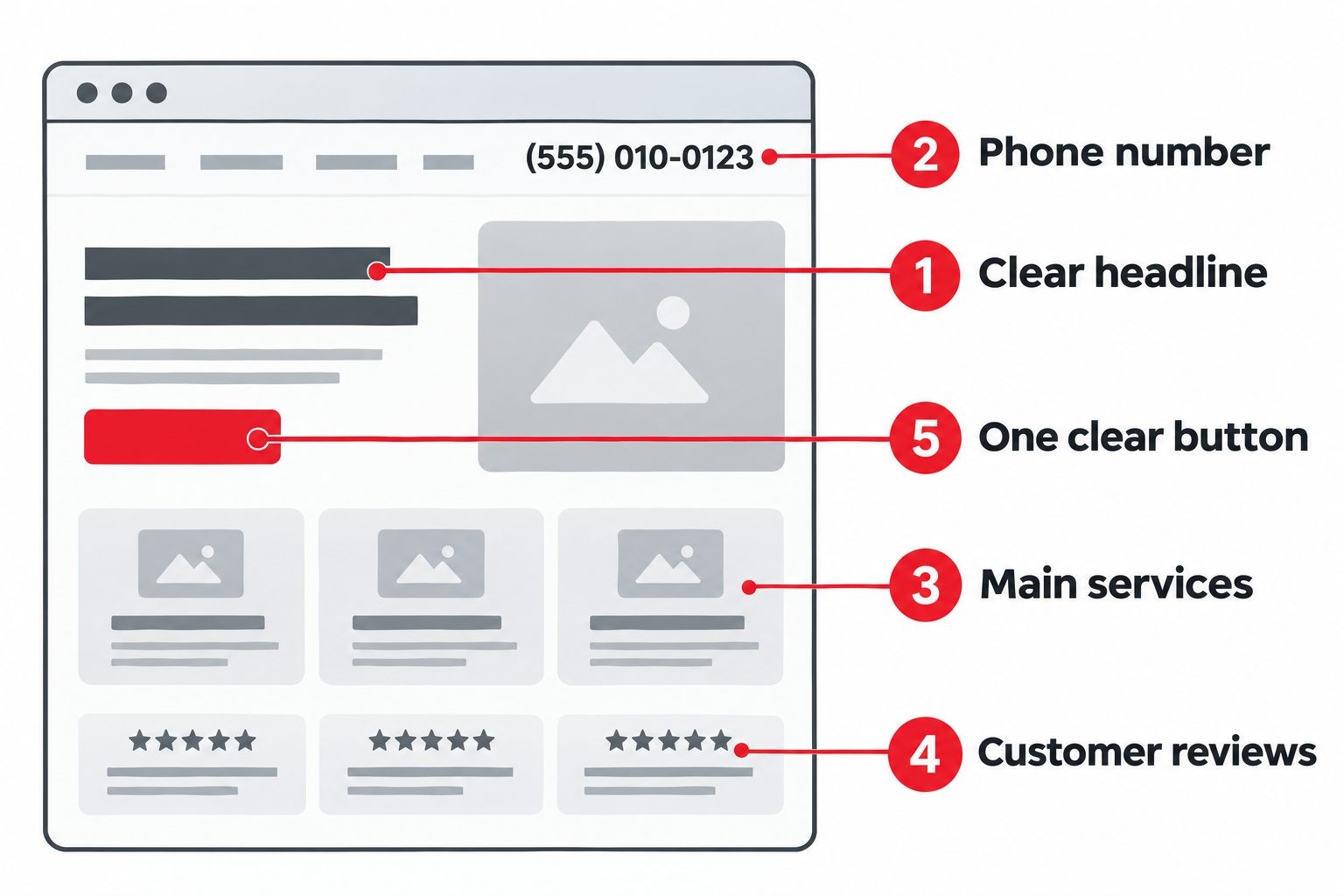
A quick checklist for your home page can help. Include a headline that says what you do and where, a short paragraph about who you help, three to five of your main services, a few customer reviews, your phone number near the top, and one clear button that tells visitors what to do next. If a stranger can understand your business in ten seconds, the page is doing its job.
Step 3. Write the Core Pages
Most small business sites need four pages to start. The home page explains your business in a few clear sentences and points visitors to the next step. The services or products page lists what you offer in plain words. The about page introduces the people behind the business, which builds trust. The contact page shows your phone number, email, address, hours, and a simple form.
Write the way you speak to customers. Skip jargon, lead with benefits, and include real details such as the areas you serve and how quickly you respond.
Step 4. Claim and Complete Your Google Business Profile
If customers find you by location, this free listing may be the most valuable thing you create. It controls how your business appears in Google Search and Maps, showing your hours, photos, reviews, and contact buttons.
Claim your profile, verify it, and then fill in every section. Choose the most accurate main category, add your service areas, write a clear description, upload real photos of your work and your space, and keep your hours current, including holidays. Google explains how relevance, distance, and prominence affect rankings in its guide on how to improve your local ranking on Google. Once the profile is live, keep it active. Post updates about offers and events, answer questions people leave, and add fresh photos every month, because an active profile tells customers you are open for business.
Step 5. Get Listed in Business Directories
Business directories help customers find you and send search engines extra signals that your business is real and where it operates. Start with the major ones for your region, then add directories that match your industry.
The most important rule is consistency. Your business name, address, and phone number should be identical everywhere, down to the spelling of "Street" or "St." Small mismatches can confuse both customers and search engines. To understand why this still matters, read why online directories still matter.
Directories come in a few types, and a good mix works best:
- General directories that list every kind of business and are often the first place people look.
- Industry directories for your trade, such as home services, legal, or health.
- Local directories run by your city, chamber of commerce, or community groups.
- Review-focused platforms where customers compare and rate businesses.
Start with five to ten quality listings instead of dozens of low-quality ones. A smaller set that you keep accurate is worth more than a long list that goes out of date.
Step 6. Collect and Show Customer Reviews
Reviews are some of the strongest proof you can have. Many customers read them before choosing, and they also influence how prominently you appear in local results.
Ask happy customers for a review right after a good experience, when the memory is fresh. Make it easy by sending a direct link by text or email. Reply to every review, thanking people for the good ones and responding calmly and helpfully to the bad ones. You can collect reviews on Google, and also on independent platforms such as Clutchpilot, where customers can find, rate, and review businesses. For a deeper look, see how to build trust online with reviews.
Play by the rules. Never buy fake reviews or write them yourself. The Federal Trade Commission has published guidance on its rule on consumer reviews and testimonials, and following it protects both your reputation and your business.
Step 7. Choose One or Two Social Channels
You do not need an account on every platform. Pick the one or two where your customers already spend time. Visual businesses such as salons, cafes, and boutiques often do well on Instagram and TikTok. Professional services often work better on LinkedIn. Local communities frequently gather on Facebook.
Complete each profile fully with your logo, a clear bio, your website link, and your contact details. Then post a little, consistently. One helpful post a week that you can keep up beats a daily schedule you abandon in a month. A profile that has not been updated in a year looks worse than no profile at all.
For example, a small bakery might share a photo of the morning's fresh bread, a short video of a cake being decorated, and a reminder about holiday pre-orders. None of that needs a studio or a big team, only a phone and a few minutes, and it shows customers that real people are running the shop.
Step 8. Publish Helpful Content
Content proves that you know your field and gives people a reason to visit your site. It can be as simple as a blog post, a short guide, a frequently asked questions page, or a before and after story from a recent job.
Start with the questions customers already ask you. If people often ask how long a repair takes or what a service costs, write honest answers. Each helpful page can bring in visitors for years, and it makes your business feel approachable and knowledgeable.
Here are a few easy content ideas to begin with:
- A page answering your five most common customer questions.
- A short guide explaining how your process works from first call to finished job.
- A project gallery with a sentence or two about each result.
- A seasonal tips post, such as how to prepare a home for winter or a garden for spring.
- A simple "what to expect" page for first-time customers.
Step 9. Build an Email List
Social platforms and search engines can change their rules overnight, but your email list belongs to you. Add a simple signup form to your website and offer something useful in return, such as a discount, a checklist, or a monthly tips email.
Send updates on a steady schedule and keep them short and friendly. Even a small list of loyal customers can bring in repeat business at almost no cost.
Step 10. Make It Easy to Take Action
A great presence still fails if visitors cannot figure out what to do next. On every page, make the next step obvious. Add a click-to-call button for phone users, a short contact or quote form, a booking link if you take appointments, and directions if people visit in person. Use clear button text such as "Get a free quote" or "Book a visit." Remove anything that adds friction, such as long forms or hidden contact details.
SEO Basics for Your Online Presence
Search engine optimization, or SEO, is how you help people find your business when they search. You do not need to master it to see progress, because a few basics cover most of what a small business needs.
The Essentials: Titles, Service Pages, Local Keywords, and Speed
Give each main service its own page, and use the words customers actually type in search. A page called "Emergency AC Repair in Dallas" will do far better than a vague page called "Our Services." Write a clear title and short description for every page, mention your city or service area naturally, and add helpful photos with descriptive alt text. Keep pages fast and easy to use on phones.
Google publishes a free resource, Google's SEO Starter Guide, that explains these fundamentals in plain terms. For a practical checklist, see our guide to on-page SEO techniques that actually work. You can also see how listings and rankings support each other in how local SEO and business listings work hand in hand.
AI Search and Why Accurate Information Matters
Search is changing. Many results pages now show AI-generated summaries, maps, and ads above the traditional list of links. These systems pull from sources they can understand and trust, which means clear pages and accurate, consistent business details matter more than ever. Answer common questions directly on your site, keep your hours and contact details correct everywhere, and earn genuine reviews. These habits help both people and search systems see that your business is real and reliable.
Keep Everything Consistent and Trustworthy
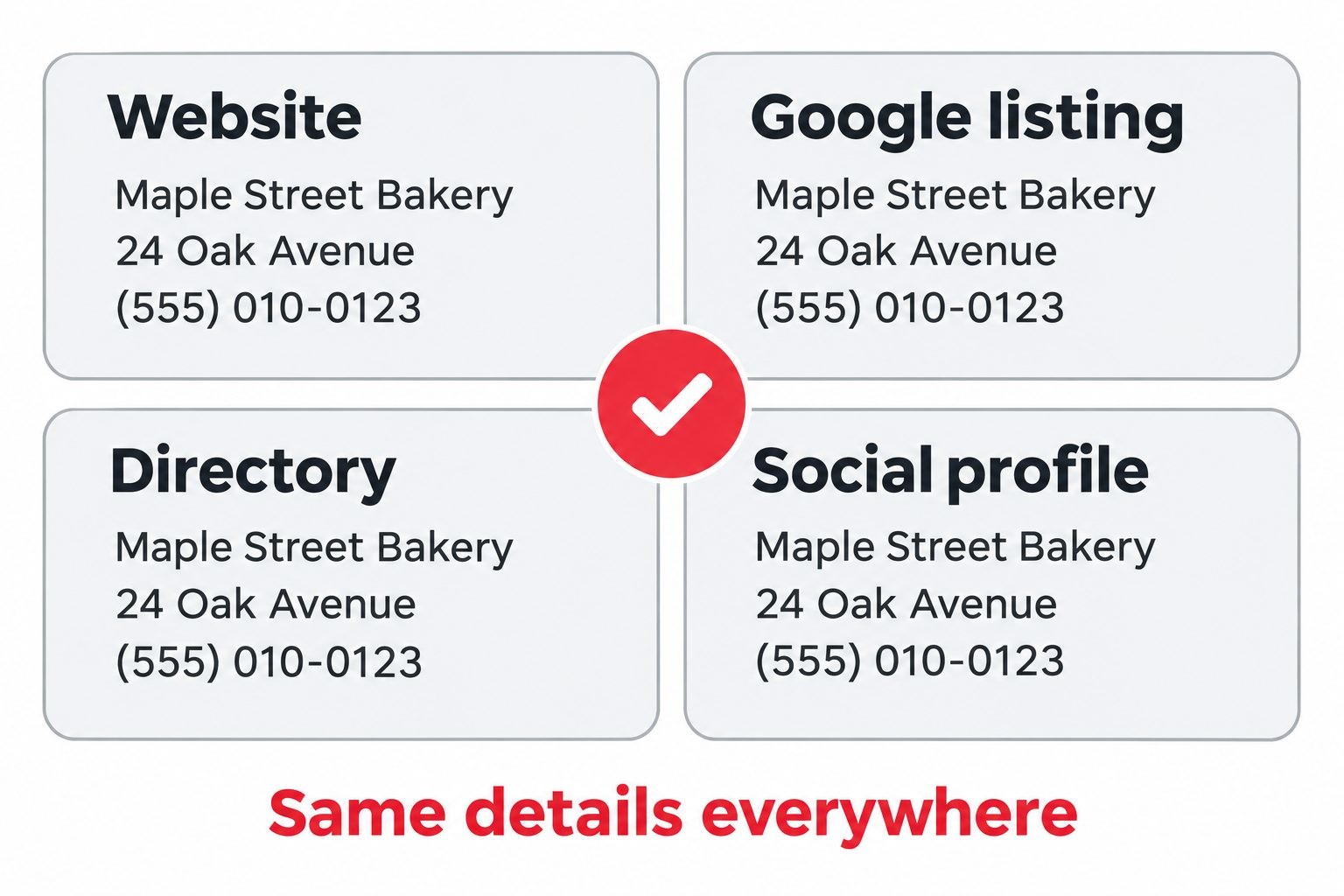
Consistency is the thread that ties your whole presence together. Use the same business name, address, phone number, hours, and logo on your website, Google profile, directories, and social accounts. When something changes, such as new hours or a new phone number, update every place at once.
Trust also depends on the basics behind the scenes. Keep your website secure with HTTPS, update your software regularly, and make sure your pages are readable for everyone, including people who use screen readers or have low vision. Simple choices such as clear text contrast and descriptive image alt text help real customers and show that you care.
How to Measure Your Online Presence
You cannot improve what you do not track, and the good news is that the most useful tools are free.
Key Metrics to Watch
Focus on a short list of numbers that connect to real business results:
- Website visits: how many people come, and from where.
- Calls and form submissions: the actions that turn visitors into leads.
- Direction requests and clicks to your website: shown in your Google Business Profile.
- Review count and average rating: a simple measure of trust.
- Email signups: a sign that people want to hear from you.
Write down your starting numbers before you make changes. That gives you a baseline, so you can tell real progress from random ups and downs.
Free Tools to Use
Google Analytics 4 shows how visitors behave on your site. Google Search Console shows which searches bring people to you and whether Google can read your pages. Your Google Business Profile includes its own insights on views, calls, and requests. Check them once a month instead of daily, so you can spot real trends.
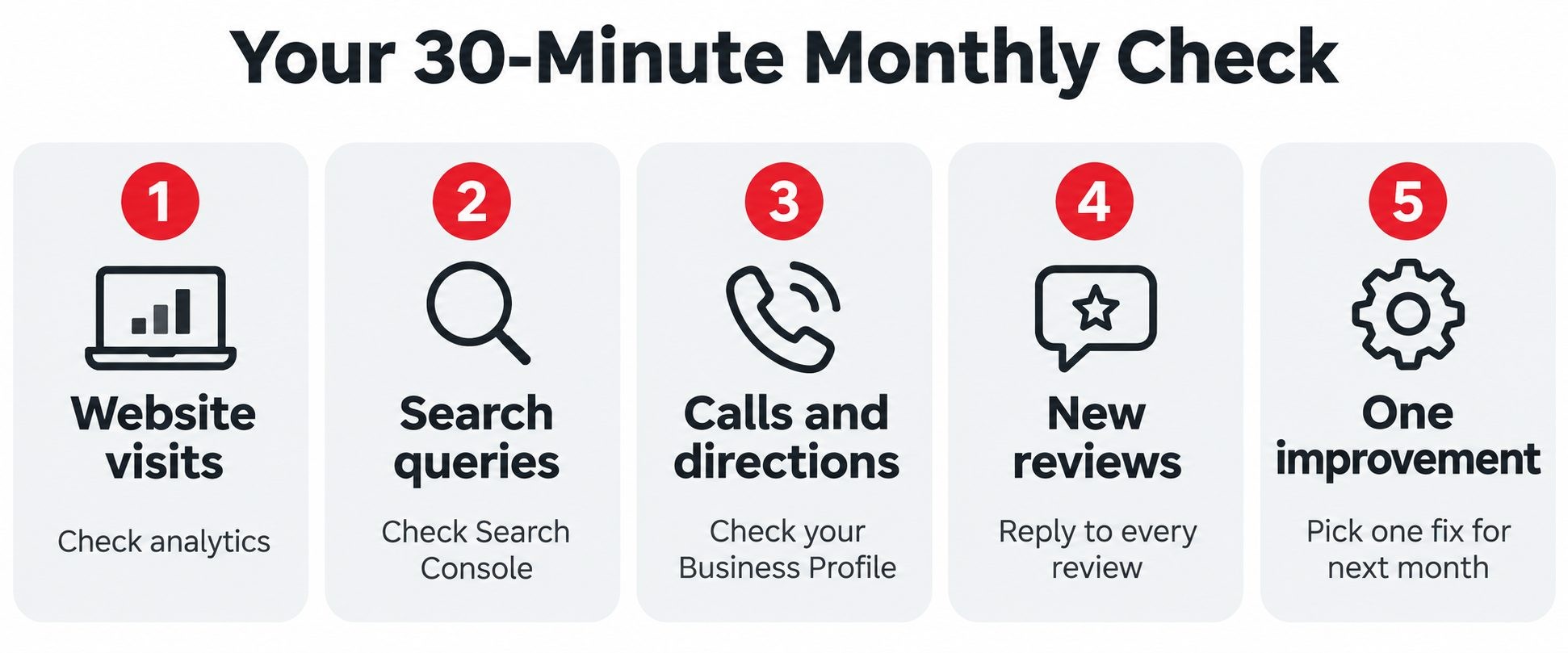
A simple monthly routine takes about thirty minutes. Open your analytics and note total visits and top pages. Check Search Console for the searches that bring people in. Look at your Business Profile for calls and direction requests. Count new reviews and reply to any you missed. Write three numbers in a notebook or spreadsheet, then decide on one small improvement for the following month.
How Much Does an Online Presence Cost?
You can start for very little. A domain name and basic hosting or a website builder plan are usually the biggest early costs. A Google Business Profile, directory listings, social media accounts, and analytics tools are free or nearly free. Paid extras, such as a custom website design, professional photos, or advertising, can come later when your business is ready.
A sensible order for spending is to cover the essentials first, which are your domain, website, and email. Next, invest in things that build trust, such as professional photos of your work. Only after that should you consider ads or paid tools, once you know what your customers respond to. This keeps your early costs low and your money focused on what moves the needle.
You also have a choice between doing it yourself and hiring help. Doing it yourself costs the least money but takes the most time. Hiring a freelancer works well for specific jobs such as building a website or taking photos. Hiring an agency suits larger budgets and ongoing needs. If you decide to hire, compare several providers, ask for examples of similar work, and read independent reviews. You can browse marketing and advertising businesses and their reviews in Clutchpilot's marketing and advertising category. Prices vary widely, so always get a clear scope and quote before you commit.
Common Mistakes to Avoid
- Leaving your Google Business Profile unclaimed. Others may suggest edits, and you miss the easiest local win.
- Using inconsistent details. Different phone numbers or addresses across sites confuse customers and search engines.
- Opening too many social accounts. Abandoned profiles make a business look inactive.
- Ignoring reviews. Unanswered reviews, especially negative ones, hurt trust.
- Building a slow or hard-to-read mobile site. Many visitors leave within seconds if a page is awkward on a phone.
- Hiding contact information. If people cannot find a way to reach you, they will not try for long.
Search errors can also quietly reduce your traffic, so once your setup is complete, review your pages for missing titles, slow loading, and broken links. The good news is that every mistake on this list is fixable, and most take less than an afternoon.
Free and Low-Cost Tools to Get Started
- Website: a website builder or WordPress, plus a simple theme.
- Design: Canva for logos, social graphics, and simple branding.
- Website checks: a quick review with SEO Site Checker to spot slow pages, missing titles, and other basics.
- Analytics: Google Analytics 4 and Google Search Console.
- Email: Mailchimp or MailerLite for signup forms and newsletters.
Check current pricing before you commit, because free tiers and plans change often.
Related reading: How to start a blog in the United States and make money
Frequently Asked Questions
Conclusion: Start With the Basics and Build Over Time
An online presence is not one big project. It is a handful of small, practical pieces that work together: a clear website, a complete Google Business Profile, consistent listings, genuine reviews, and a steady habit of showing up. You can build the essentials in a few weeks and improve them for years.
Pick three things to do this week. Claim your Google Business Profile, check that your business details match everywhere, and ask your next happy customer for a review. Once your foundation is in place, move on to promoting it with our guide to digital marketing for small business.
No Tags

Comments (0)